Outstanding Invites
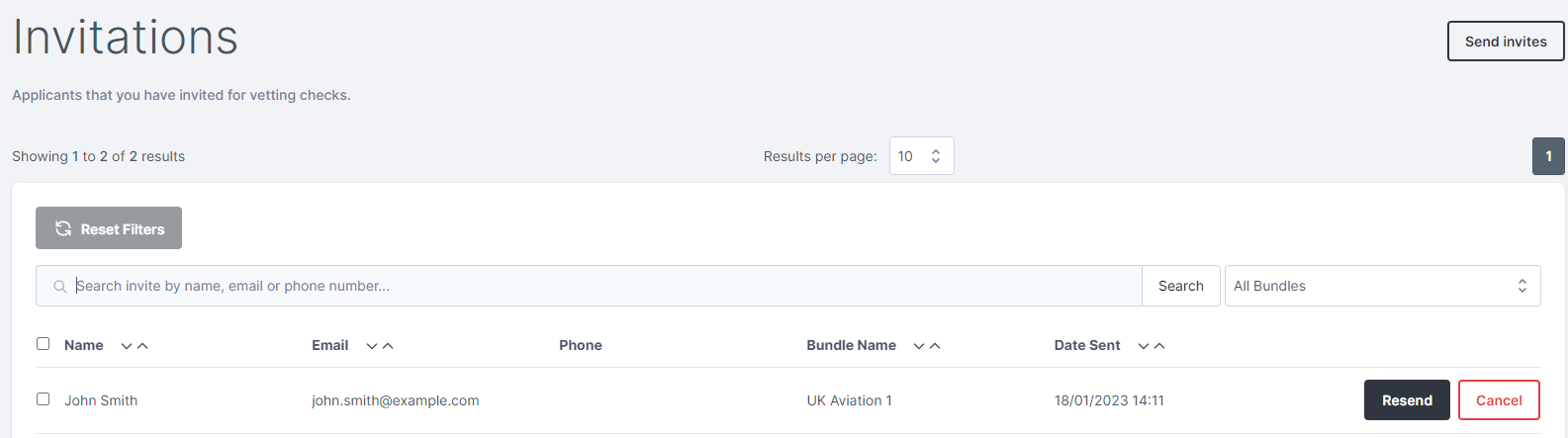
Once you have invited an applicant, their invitation will be marked as Outstanding until they have registered with VettingGateway. You can view all outstanding invites by either clicking on the Outstanding Invites panel on your dashboard, or by going to Invitations in the side menu.
Cancelling an invite
Cancelling an invite will prevent the applicant from following their VettingGateway invitation link. You can cancel outstanding invites by clicking the Cancel button to the right of each invitation.
Cancelling an outstanding invite will restore any credits used to invite that applicant.
Resending an invite
Sometimes applicants may need the VettingGateway invitation email to be resent, particularly if their previous one ended up in their spam/junk folder. This can be done by clicking the Resend button to the right of each outstanding invitation.
If Your Applicant Has Not Received Their Invitation Email
If an applicant reports that they have not received their invitation email, it may have been blocked or filtered by their email provider or their organisation's IT systems.
Check First
Ask the applicant to check the following before taking further action:
- Their spam or junk mail folder
- Any quarantine folder managed by their IT department
- That the email address on their invitation matches the address they are checking
Resending the Invitation
If the email is still not found, you can resend it:
- Go to Outstanding Invites on your dashboard.
- Locate the applicant and click the options menu.
- Select Resend Invitation.
If the applicant works in an organisation with strict email filtering, their IT team may need to allow the following to ensure VettingGateway emails are delivered. The sending domain is @vettinggateway.com