Custom Bundles
Note
In VettingGateway we refer to a collection of different background checks as a Bundle.
For example, the UK Aviation 4 Bundle contains 5 Year Referencing, 1 Basic DBS Credit, and 1 GSAT Credit.
The individual parts are checks and the collective is a Bundle.
A Custom Bundle allows you to meet the specific vetting requirements of your business by defining the background checks that you want your applicants to undergo.
There are two ways to create a Custom Bundle:
- Click + New Check and choose the Build your own option. This will then show all the options you can configure and the standard to which you can vet your applicant against. Completing this will save this configuration as a Custom Bundle for you to use again.
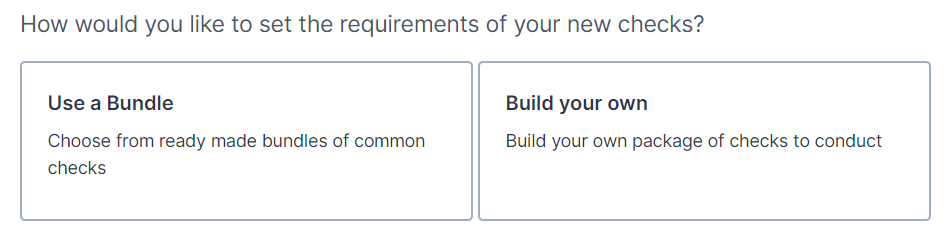
- The alternative way is to go to the Bundles section in the Admin panel. From here you can click + Create New Bundle.

Creating a Custom Bundle
Tip
If your organisation vets applicants against different standards for different roles, create a separate bundle for each role type. This ensures the right checks are always applied at the point of invitation.
When creating a new Custom Bundle, you will be presented with a number of sections to complete to meet your business needs.
Follow the on-screen instructions to complete your new Custom Bundle.
How to manage Custom Bundles
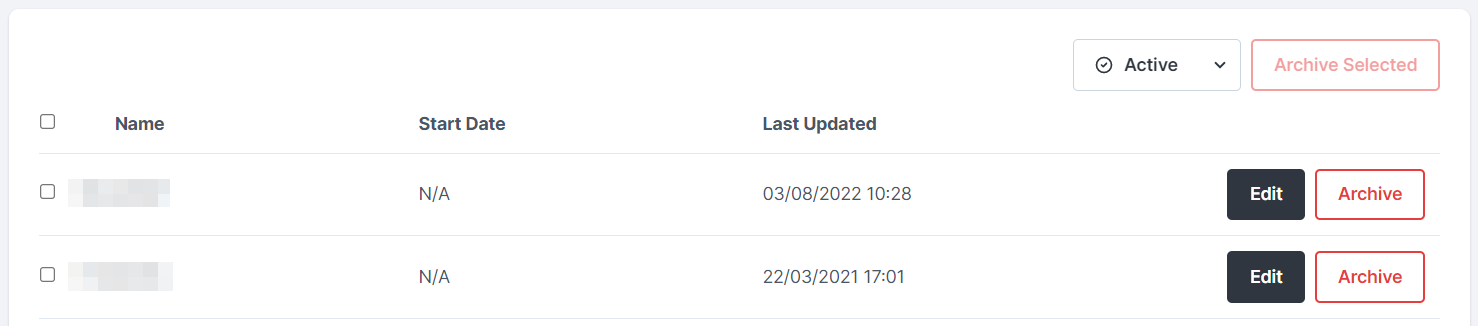
Once you have created your Custom Bundle, it can be found by going to Admin > Bundles. From here, you can manage your existing Custom Bundles as outlined below.
Editing an existing Custom Bundle
An existing Custom Bundle can be edited by clicking the Edit button next to the name of the Custom Bundle. This will open up the Edit Bundle page, allowing you to amend the configuration of the Custom Bundle that was defined at its inception.
Once you have made your changes, scroll down to the bottom of the page and click Continue.
Archiving a Custom Bundle
If your business no longer requires a certain Custom Bundle, click the Archive button next to the name of the Custom Bundle. Then click Yes, archive Bundle.
Once a Custom Bundle has been archived, it will no longer appear in the list of Active Custom Bundles. You can change the filter on this page from Active to Archived to view any archived Custom Bundles. From here, you can unarchive any Custom Bundles that you'd like to be made active again.
